
Materials
A time capsule with a QR code: making sure someone can still open it in twenty years
A plaque on stone will outlast any server. The question is not how beautifully you bury a story but who will open the link in twenty years — and whether it died long before that.
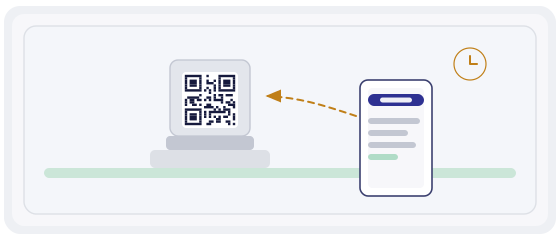
A time capsule is a promise, not a hiding place
An ordinary capsule works simply: you bury it, you set a date, you dig it up. Nothing can fail, because paper sits inside and concrete sits on top.
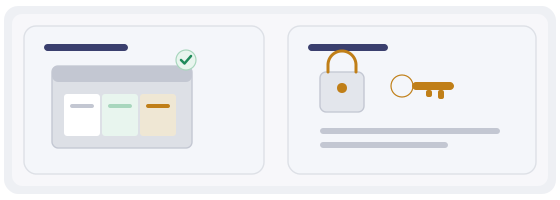
A digital capsule is different. The metal plaque or the stone stays where it is, while the content lives on the internet: letters, photographs, voices, video. And that is where people stop thinking — everything on the internet needs somebody to look after it.
So the real question is not "what do we put in", but "who is responsible for access in ten years".
What actually has to survive
People remember the files and forget the other two things. Those are the ones that die first.
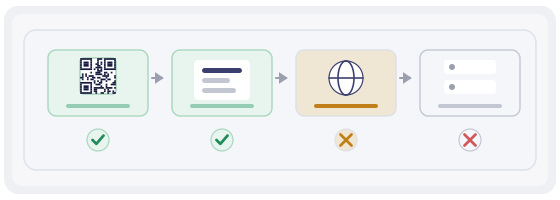
What dies first
The order is predictable, and it is worth knowing before you decide your capsule will "just keep working".
- A free file-sharing service. Goes first. Five years later the link no longer opens, and nobody noticed because nobody checked.
- The domain. It lasts as long as someone pays. Forget the renewal and the address is no longer yours.
- The account. Tied to an email, the email to a phone number, the number to a person. The chain is longer than it looks.
- The person. Whoever knew the password eventually leaves the project. This is the most common cause of a capsule dying quietly.
- The format. Slowest, but the sneakiest. The file is there and there is nothing left to open it with.
Two architectures, and the difference is huge
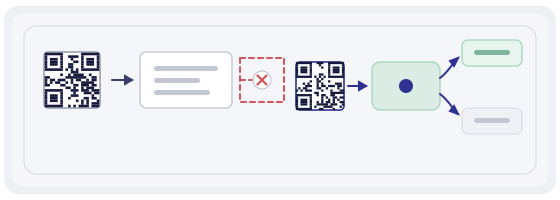
A code holding a direct address
The square contains a link to one specific file. It looks solid, but if the server moves the plaque has to be replaced. And a granite plaque is not something you redo in an evening.
A code pointing at your own address
The square holds a short address and you decide where it leads. The archive moves, the domain changes, the material grows — the plaque stays exactly as it was.
The rule is simple: put into the stone only what you never intend to change. Everything else lives on the server.
Who opens it if not you
This is the dullest part of the project and it decides everything. A capsule only one person can open is not a capsule, it is a private folder.
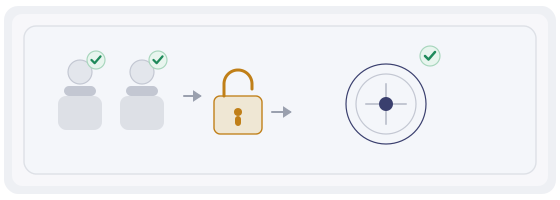
Agree on two responsible people: not "someone from the community" but named individuals with named roles. One looks after the material, the second holds the account access and can restore everything.
Write down on paper what nobody normally writes down: where the account lives, which email it is tied to, who has a copy of the password, where the archive currently sits. That sheet is kept at the institution, not in one person's head.
And check the capsule once a year. One person, ten minutes, one line in a log: does it open or not. It sounds petty until you discover the link has been dead for three years.
A public layer and a private layer
Not everything you store should be readable by a passing stranger. And not everything should be locked, or the capsule loses its point.

The public layer is a short story: what this place is, the key dates, a few photographs, a few voices. It is for whoever stopped by the plaque with a phone in hand.
The private layer is family letters, documents, sensitive memories. It sits behind separate access: a link handed out individually, or an invitation.
Most important: the public page must never accidentally expose the private one. That happens more often than people think, usually when everything is thrown into one folder "so it does not get lost".
Formats that will outlive you
A boring rule applies here: the simpler, the longer. Plain text, PDF, JPEG, MP3 will open almost anywhere even twenty years from now.
Complex formats with their own software are a risk. Project files, specialised archives, interactive presentations look wonderful today and become helpless once the program is gone.
And always keep a copy outside the internet. A disk in the institution's cupboard, a printed description, a drive in the safe. Digital preservation is not one technology; it is several independent copies that cannot vanish at the same moment.
What a promise costs
A ten-year capsule is not a one-off expense but a small annual one. A domain, hosting, possibly a service fee. Work that out before you ceremonially unveil the plaque.
The good news: the sum is usually laughable next to the cost of the plaque itself. The bad news: you have to pay every year and remember it when the accountant changes.
So put a line in the budget from the start — "capsule upkeep" — with a payment date and a named owner. Otherwise, three years later nobody will remember why something appears on the card statement.
Six mistakes that happen almost every time
- Etching a direct link into stone when the file will move within a year.
- Leaving account access with one person and no backup.
- Relying on a free service and never checking on it for years.
- Keeping everything in one complex format with no simple copy.
- Mixing public and private material in the same folder.
- Leaving not a single written description of how the whole thing works.
Your first capsule in one evening
Do not start with granite. Build a small capsule for an event you know well: a school leavers' year, an anniversary, an old courtyard.
In the generator, create a code that leads to the story page. Test the one thing that matters: you can change that page without touching the physical object. That is your protection for all the years ahead.
In QR Studio, build a layout for the actual material: metal, glass, paper. A code on a glossy surface is easily ruined by glare, and better to see that on a mock-up than on a finished plaque.
Then walk the visitor's path with the scanner and look at what they see before the page opens. In twenty years that will be the only hint of whether it is worth raising a phone at all.