
Materials
A QR code on sheet music: making the notes open exactly when they are needed
The square on paper is not the score. It is only the doorway. And it works when, within a second, it opens what the person actually needs at that moment: the notes, their own part, a recording, or the concert programme.
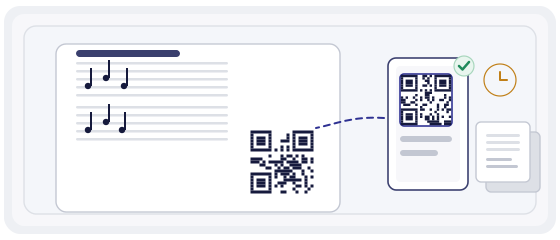
The difference between a pretty QR and a useful one
The most common mistake is putting up a code that leads to a general page reading "our music". The person scans, sees a list of thirty works and closes the page.
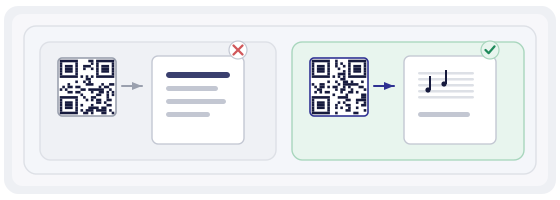
A useful code leads to one specific place: this part, this performance, this edition. Not "our music" but "viola, second movement, rehearsal tempo".
And a second thing: the code has to be able to change. The concert programme is updated, a misprint in the score is fixed, a recording is replaced with a better one. The paper stays exactly as it was.
Three places where this actually works
Not every musical situation needs a code. But there are three where it genuinely saves time.

What has to happen in the first two seconds
Musicians drop anything that gets in the way of playing. So the path has to be short and predictable.
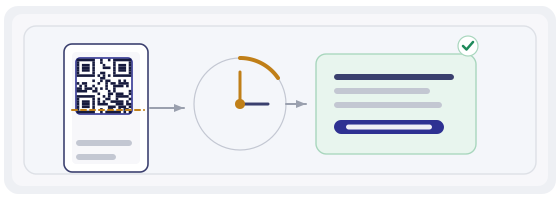
- The person points the phone at the code.
- A page opens with the title and the movement — no menu, no adverts.
- The notes are visible immediately, not behind "download PDF" and a folder search.
- There is a full-screen button — on a music stand this is essential.
- If there is a recording, it sits separately so it does not compete with reading.
Every extra tap is one more person who puts the phone down and does not try again. In rehearsal that is annoying; in the hall it is already a problem.
The real enemy is the screen and the light
Almost nobody thinks about this until they try to read music from a phone on stage.
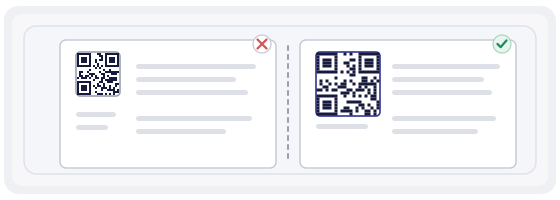
Tiny type, thin staff lines, glare from a lamp — and the score becomes unreadable. A PDF made for A4 printing almost always looks bad on a phone screen.
Just a PDF on a phone
You zoom, you scroll, you lose your line. In rehearsal maybe; in a concert, no.
A page built for a small screen
Big notes, one system across the screen, a dark background for the stage. It looks plain, but it reads at a glance.
Check before printing: open your page on a phone, put it on a music stand and step two paces back. If you cannot read it, redo it rather than hope.
One code, different parts
The most useful part for ensembles. The same code on paper can open different things depending on who opens it and how.
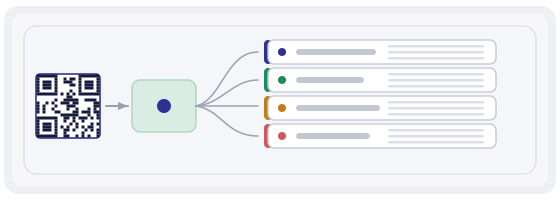
The simplest version is a separate code per part: violin, viola, cello. A slightly more complex one is a single code and a short choice on the page: "which is your part?".
The second is friendlier when the line-up changes. The first is better when speed matters and nobody wants to choose twice.
And separately, the important bit: when an edition is corrected, the players must get the new version from the same code. Otherwise somebody plays the old one, somebody the new one, and in rehearsal it turns out nobody is to blame.
When a code only gets in the way
Honestly, there are situations where paper wins, and that is fine.
- An orchestra that refuses to have phones on the stands.
- A concert where a phone in the hall is out of place — and the audience feels it.
- A piece performed once and never again.
- Material that cannot be shown for free out of respect for copyright.
Be especially careful with the last one: you cannot publish somebody else's scores openly. A code can lead to a page with a description, to your own composition, or to a page where the score is sold — but not to a pirated copy.
When the code is out in the open
On a wall, on a poster, on a programme cover the code becomes part of the design, and that is where small things start to show.
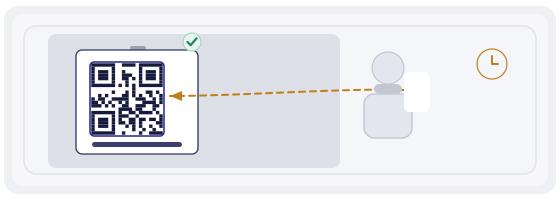
It has to contrast with the background. It needs clear space around it — without that the camera will not read it. And it must not sit where a hand, a bag or a leaflet rack will cover it.
Check this on the real material, not on a computer screen. A matte programme, a glossy poster and a concrete wall give very different results.
Six mistakes that happen most
- One code for all the music at once, with no specific page behind it.
- An A4 PDF with no adaptation for a phone.
- A page with a menu and a banner instead of the notes.
- A corrected edition that never reached the players.
- A code on glossy paper under a lamp, with no glare test on the mock-up.
- Other people's scores published openly without permission.

Try it with a single piece
Take one piece you know well, not the whole repertoire.
In the generator, create a code pointing to that piece's page. Build it so it can be updated: tomorrow you may want to add a recording or fix a misprint in the notes.
In QR Studio, make a layout for the actual object: programme, poster, a sticker on the music stand. Do not forget the clear space around the code — that is the most common reason a code "will not scan".
Then walk the musician's path with the scanner: look at what is visible before the page opens. If it is unclear where the code leads, people simply will not tap it.